Cloud-at-home on mini-PCs
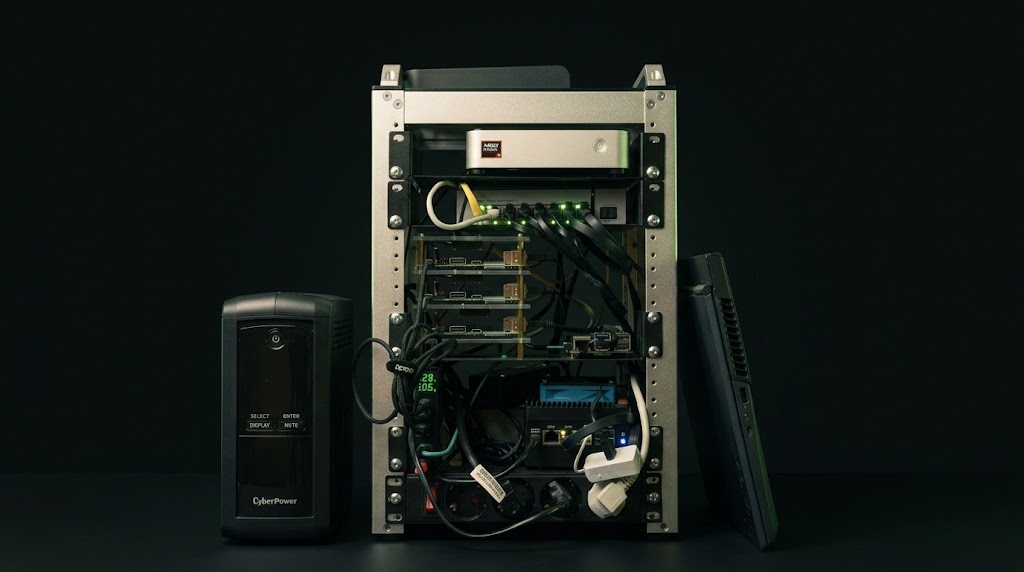
A seven-node heterogeneous Kubernetes cluster assembled, provisioned, and operated from Git. It is the foundation every other project runs on.
Problem
Running production-like workloads at home means starting without the safety nets a cloud provides: no managed control plane, no elastic capacity, and no vendor who owns the failure. The first attempt was a cluster of consumer ARM single-board computers. It worked for lightweight services but proved unreliable and slow for data workloads, with SD-card failures and firmware quirks that consumed more time than they saved.
The challenge was to turn a mixed pile of affordable hardware into something that behaves like a real platform.
Approach
The cluster is treated as a product with a delivery pipeline, not a collection of machines.
- Heterogeneous by design: ARM64 boards carry lightweight and multi-arch workloads, while x86 mini-PCs, including a dedicated NAS and a GPU worker, handle Spark, Trino, and inference.
- Provisioned as code: Ansible installs the OS and K3s and seeds ArgoCD. After that first run, Git is the only interface to the cluster.
- Delivered via GitOps: ArgoCD reconciles one Application per namespace, layered as secrets, then core, then AI.
- Storage matched to data: replicated block storage for databases, object storage for the lakehouse, and bulk RAID for media and archives.
- Hardware chosen on evidence: the move to x86 mini-PCs was driven by measured performance-per-euro, not preference, and is documented in Lessons Learned.
Technologies
- K3s on mixed ARM64 and AMD64 nodes
- Ansible for OS provisioning, K3s install, and ArgoCD bootstrap
- ArgoCD and Helmfile ApplicationSets for GitOps delivery
- Longhorn, Garage, and NFS for storage
- Tailscale, Traefik, and cert-manager for access and TLS
Outcome
The result is a seven-node cluster that can be rebuilt from repositories and whose state is continuously monitored. It has survived hardware replacement, chart deprecations, and a storage migration, which is exactly the kind of operational experience a homelab is for. Everything else in this catalogue runs on it.
Further reading
- Architecture: the logical and physical layout
- Hardware: the rack and its components
- Provisioning: from bare metal to running platform
- Hard Lessons: the failures that shaped the design